
Text first, visuals as depth
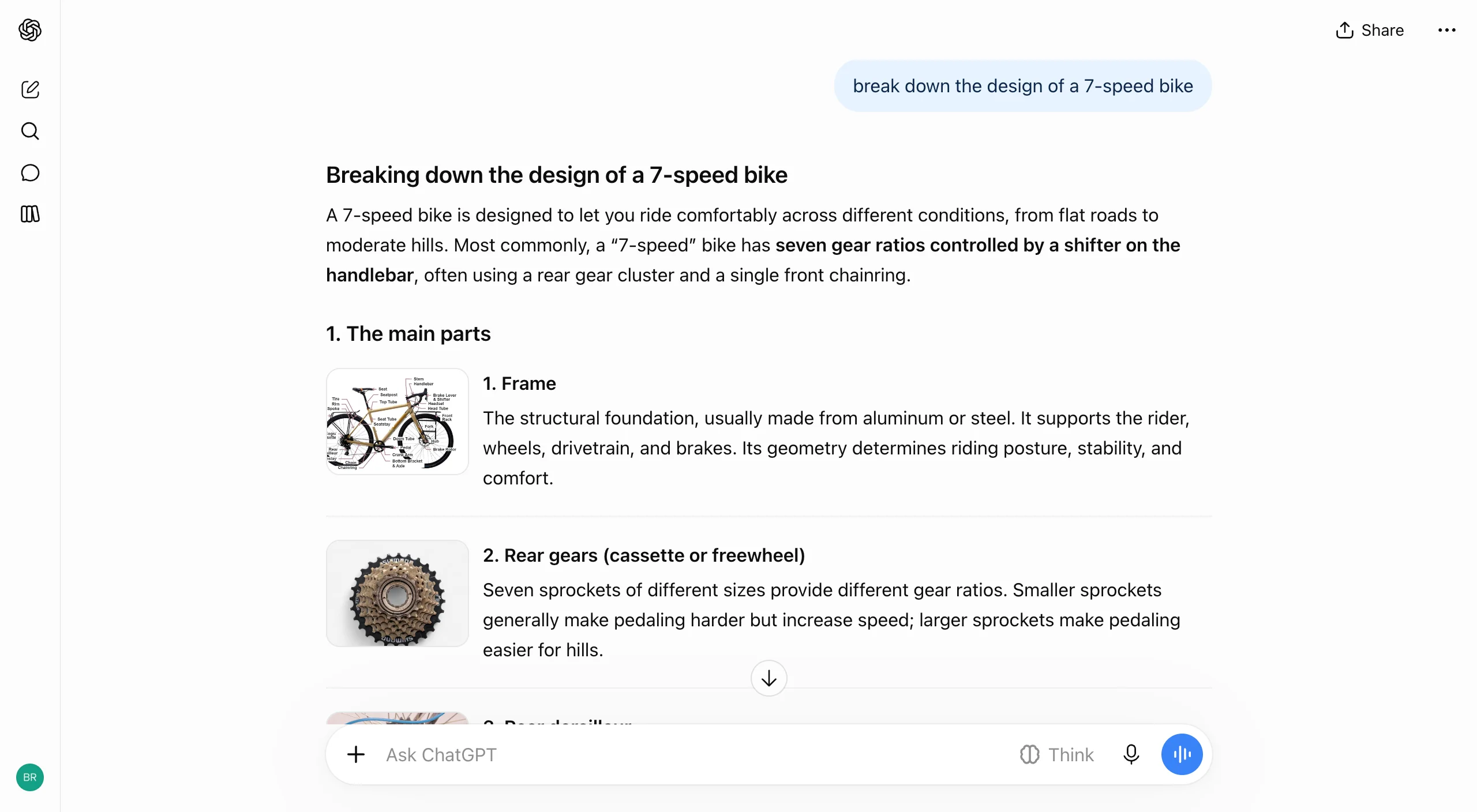
What works
- Text leads. A short summary answers the question before any visual appears, so the visuals add depth instead of replacing the answer.
- List items can carry a thumbnail next to their text, which turns a plain list into something you can scan by picture.
Product bet
Explaining things is ChatGPT's biggest everyday use. If "explain X" comes back looking like a page from a good textbook, the free tier feels like a learning tool, and nobody has to learn a new mode to get there.
Tradeoff
| Decision | Benefit | Cost |
|---|---|---|
| Model decides when to add visuals | No new mode to learn; text still answers first | Hard to predict when visuals will appear |
Takeaway
Lead with text that stands alone and treat visuals as optional depth.
Pattern: Generative UI
Pattern: Progressive Disclosure
Web photos carry a source label
What works
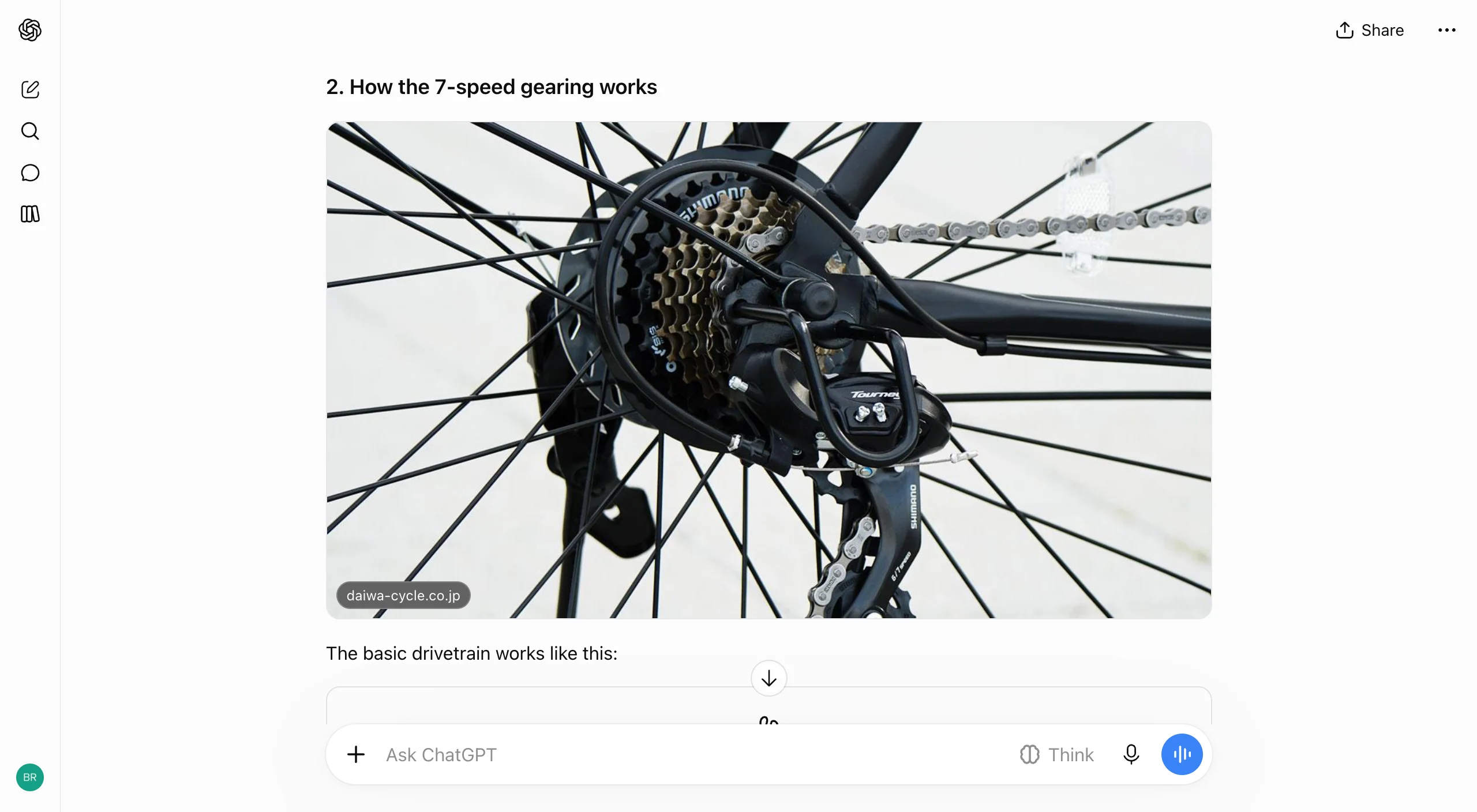
- ChatGPT pulls real photos from the web into an explanation without switching into a search mode.
- A domain chip sits on the image itself, so you can tell a sourced photo from a generated one.
What we would push on
- The chip only shows a domain. There's no page title, and nothing signals whether it links out.
- Images render at full column width. On a laptop that pushes the explanation, which is the actual answer, below the fold.
Product bet
Real photos make answers feel grounded without switching into search mode. The source chip is cheap insurance against "is this image even real?"
Tradeoff
| Decision | Benefit | Cost |
|---|---|---|
| Web photos inline with a domain chip | Concrete visuals; provenance at a glance | Large images push text down; thin attribution |
Takeaway
Put the source on every image the model didn't generate, right on the image.
Pattern: Generative UI
Pattern: Citations
A fixed kit of native components
What works
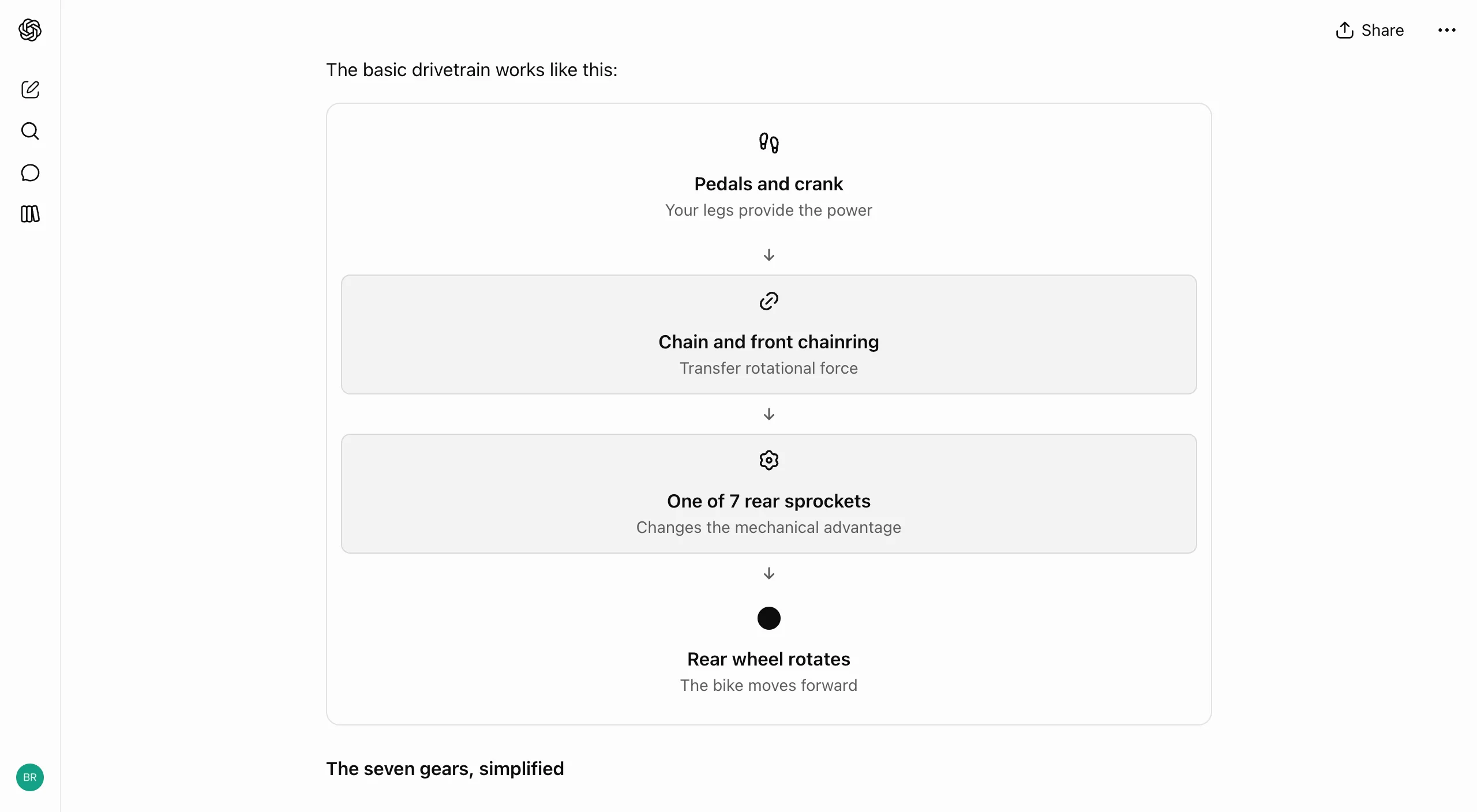
- Components look like ChatGPT, not a web page pasted into a reply. OpenAI says it built "a library of native, streamable components" plus a compiler that renders the interface while the model writes it.
- The kit goes beyond tables. It includes diagram components like step flows, so a process can be shown as a process.
- Native components look the same on web and mobile, which Claude's free-form code artifacts can't promise.
What we would push on
- A closed kit sets a ceiling. Anything outside it presumably falls back to text, and you can't see where the edge is.
- If components arrive mid-stream, the layout can shift under text you're already reading.
Product bet
Holding the model to a design system gives up some range in exchange for consistency, speed and safety. With 1.2 billion weekly users, most of whom never asked for an app, that's the right call.
Tradeoff
| Decision | Benefit | Cost |
|---|---|---|
| Native component kit plus a streaming compiler | Consistent, fast, same on every platform | Capability ceiling; possible layout shift while streaming |
Takeaway
For consumer generative UI, give the model a component kit, not a blank canvas. Stream it in, but reserve the space so the page doesn't jump.
A format for each idea
What works
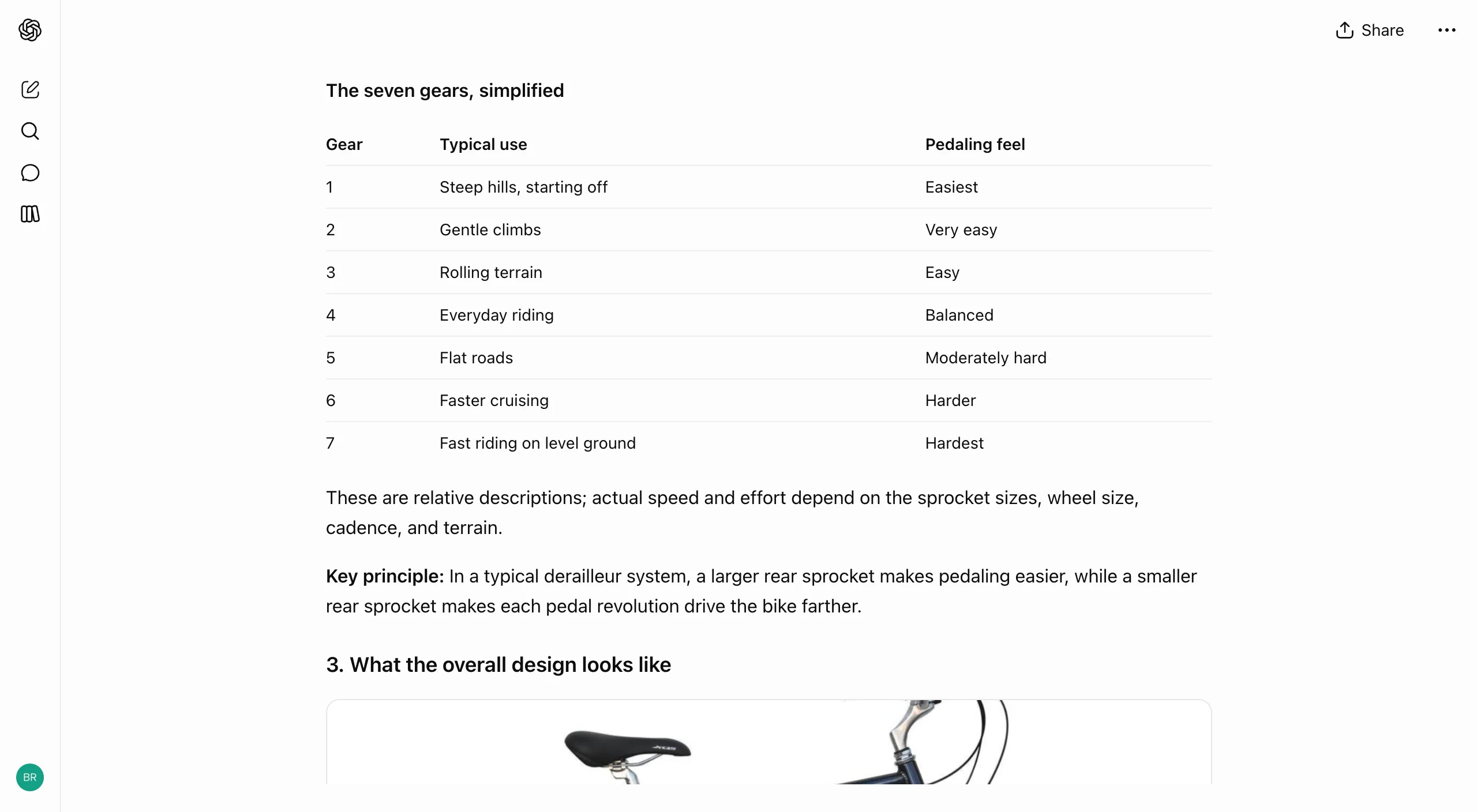
- The model picks the format per idea, not per reply. One answer can combine a list, an image, a diagram and a table, each where it fits.
What we would push on
- Mixing components makes replies long. There are no collapsible sections or table of contents to help people move around.
Product bet
Tables are the oldest structured output in ChatGPT. Keeping them in the new system means Intelligent UI includes the boring formats too, used where they fit.
Tradeoff
| Decision | Benefit | Cost |
|---|---|---|
| Several formats mixed in one answer | Each idea gets the shape that suits it | Long, scroll-heavy replies |
Takeaway
Pick the format per idea, not per answer. Then give long mixed answers a way to navigate.
Pattern: Output Format Selection
Pattern: Generative UI
A working tool inside the reply

What works
- When the request is for a tool, the reply is mostly the tool, with a line of framing around it.
- The tool runs in the thread. There's no code to copy, no preview to open and no separate pane.
- Generated tools come with their own export action, so results leave the chat without retyping.
What we would push on
- Generated tools look authoritative, even though the model can still get details wrong. Inline tools need their assumptions in view.
Product bet
Throwaway software is the way in. If ChatGPT can build the exact tool you need in seconds, it competes with single-purpose apps, not just with search.
Tradeoff
| Decision | Benefit | Cost |
|---|---|---|
| Model-built interactive tools in the thread | Instant, task-specific utility | People may over-trust the output; edge-case bugs |
Takeaway
Show a generated tool's assumptions inside the tool. Interactivity makes output look more authoritative, so it should also make it more transparent.
Pattern: Generative UI
Pattern: Chat Artifacts
A form instead of a follow-up question
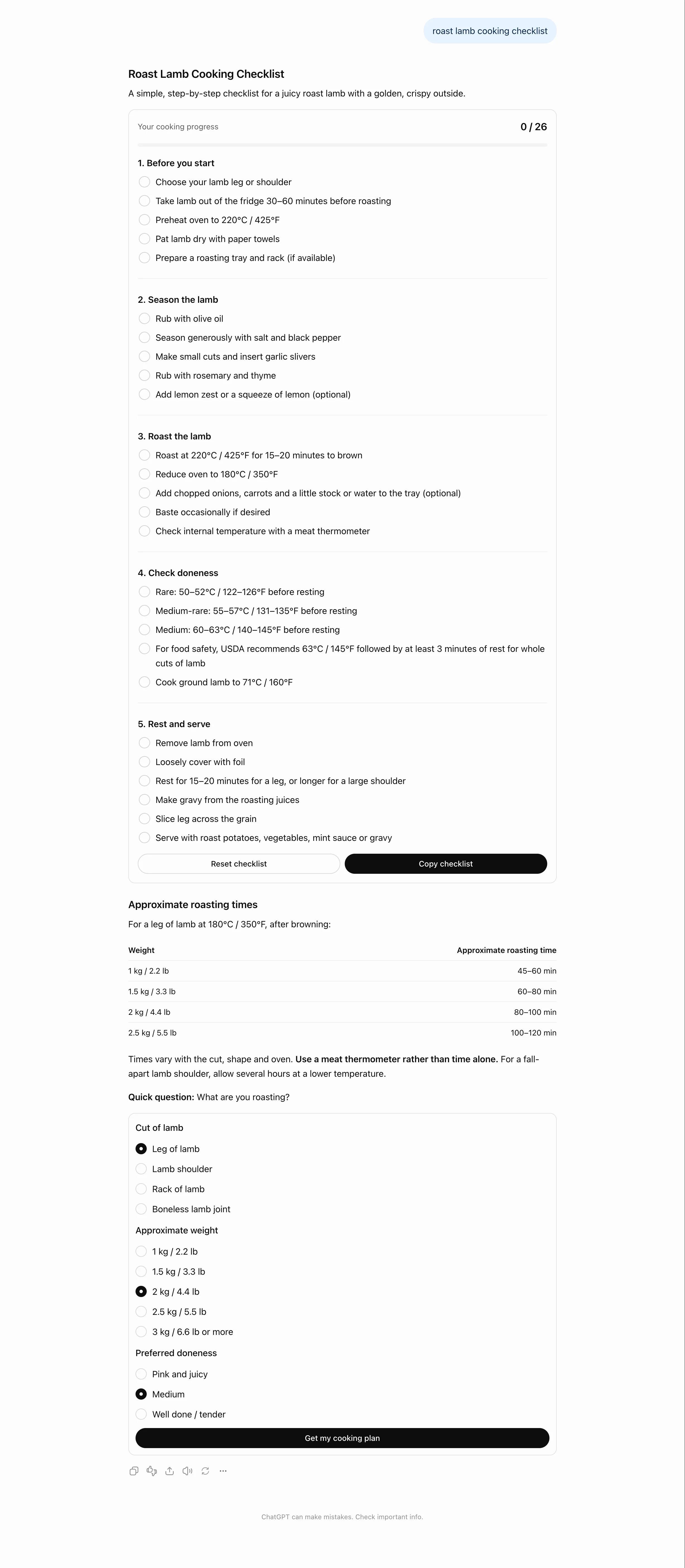
What works
- ChatGPT answers first and asks second. You get a useful answer even if you ignore the question.
- The question is a form, not a paragraph. Options arrive as radio groups, so answering takes a few taps instead of typing.
- A single submit button sends the answers as the next turn.
What we would push on
- It's unclear what happens to the form once you submit. If you change an answer later, does the reply update or start over?
Product bet
Clarifying questions usually feel like friction in chat. Sending them as a form after a useful default answer removes most of that cost. The model gets structured input and the user never has to sit through "Before I begin, a few questions."
Tradeoff
| Decision | Benefit | Cost |
|---|---|---|
| Answer first, then ask with an inline form | Useful right away; structured input for the next turn | A question after a full answer is easy to skip |
Takeaway
When you need more detail, answer with a sensible default, then ask with controls instead of prose. If the answer depends heavily on the question, move the question up.
Pattern: Human in the loop
Pattern: Generative UI
Components that keep state
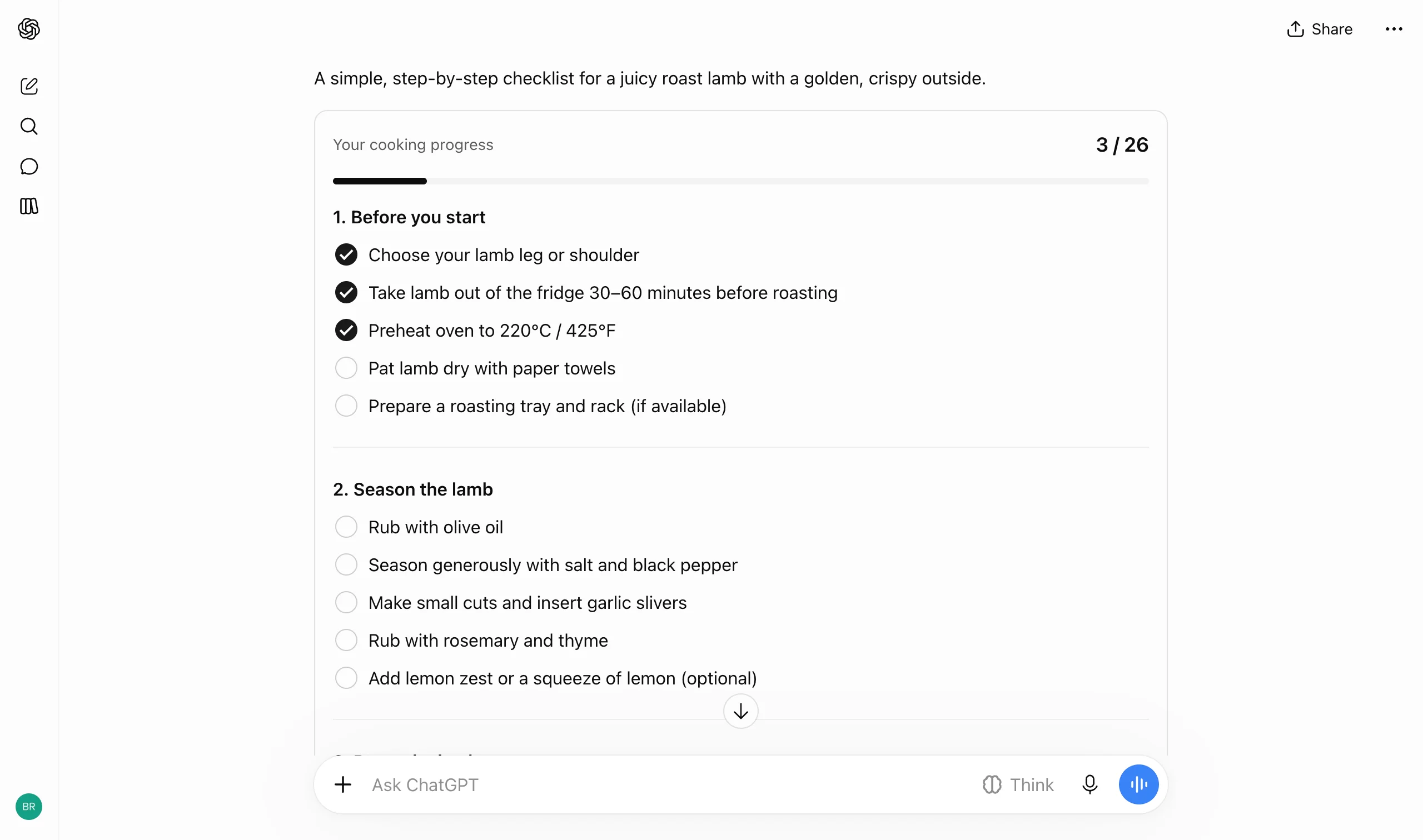
What works
- Checking a step updates the counter and the progress bar. The component holds state, so the reply is something you use, not just read.
- Component actions like reset and copy sit inside the card, apart from the chat's own message actions.
- OpenAI's help center says some components, checklists included, keep their state when you refresh the thread.
Product bet
Stateful components give people a reason to come back to a thread. The reply becomes a small working document instead of a one-off answer.
Tradeoff
| Decision | Benefit | Cost |
|---|---|---|
| Components that hold state in the thread | Replies stay useful after they're read | People can't tell what is saved or for how long |
Takeaway
If generated UI holds user input, say whether it will be saved. Losing input without warning feels like data loss.
Pattern: Checkpoints and Restore
Pattern: Generative UI
Default or Simple, with no way to see the difference
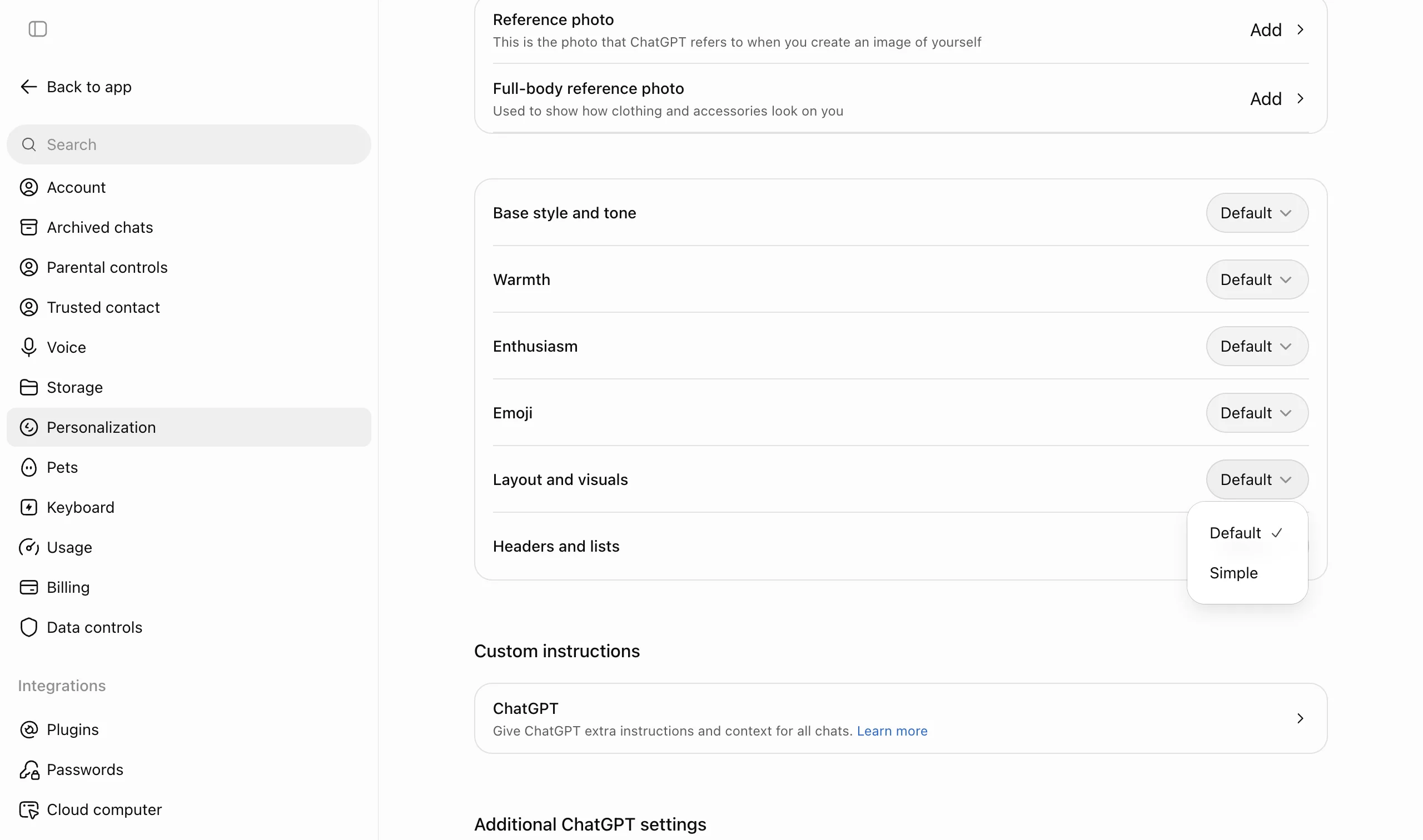
What works
- You can steer the format in a prompt, in Custom Instructions ("use tables when comparing options"), or with the Layout and visuals setting.
- The setting sits next to Warmth, Enthusiasm and Emoji. Visuals are presented as part of how ChatGPT talks to you, which is an honest description of what the setting does.
- The help center says preferences "guide the response; the exact layout can vary." It doesn't oversell the control.
What we would push on
- The dropdown offers two words, Default and Simple, with no description, example or preview. Nothing shows what Simple takes away.
- To find out, you have to leave settings, ask something, read the reply, then come back, switch the option and ask again. Every comparison is a round trip.
Product bet
OpenAI treats layout like tone, a preference you set once and forget. That keeps the settings page short, but it assumes people already know what each option looks like.
Tradeoff
| Decision | Benefit | Cost |
|---|---|---|
| Two-word dropdown with no preview | Short, uncluttered settings page | People test in chat and come back to see the difference |
Takeaway
When a setting changes how output looks, show it. A small before-and-after sample next to the options lets people choose without leaving settings.
Pattern: Output Format Selection
Pattern: AI Personality Customization
Verdict
Intelligent UI is best when generated UI does work that prose can't. A clarifying question arrives as a form you answer in a few taps. A request for a tool gets a working tool in the reply, not code to run somewhere else. A checklist remembers what you've already done.
The weak spots are around the components, not in them. The kit is closed, and you can't see where it ends. Components that stream in can move the page while you read. The one setting for tuning visuals gives you two labels and no preview, so finding the difference means testing in chat.
Claude makes you open an artifact on purpose. ChatGPT decides for you, inline, on every turn. For most people that's the better default, as long as the format it picks is easy to understand and easy to change.
Takeaway
Use generated UI where it does work prose can't, like collecting input, running a tool or tracking progress. Then make the model's choices visible and easy to change, from where an image came from to how the layout setting changes a reply.
Sources
- OpenAI, "GPT-6 and Intelligent UI for everyone" (Oct 7, 2026)
- OpenAI Help Center, "Intelligent UI in ChatGPT"
- OpenAI, ChatGPT release notes
- WIRED, "The New ChatGPT Is More Show Than Tell" (Oct 7, 2026)
- Notanaiapp, hands-on test (Oct 8, 2026)
- Skalablog, how to trigger GPT-6 Intelligent UI
- AT Pulse, showcase prompts that don't trigger visuals
- On The Wire, controls and availability
- OpenAI Developer Community, request to disable new UI features
Takeaways
Copy this
- A text answer that stands alone, with visuals as optional depth
- A source chip on every image pulled from the web
- Clarifying questions as an inline form after a default answer
- Stateful components, like checklists with a progress counter
- An export action built into every generated tool
Skip this
- Interactive output that hides its assumptions
- Components that shift the layout while people are reading
- Saving user input in generated UI without saying whether it will persist
- Output settings with bare labels and no preview of what each option looks like
How others output, artifacts & refinement
How other products handle the same job, and what each tradeoff reveals.
Compare output & artifacts UX
ChatGPT, Claude, Perplexity, and Gemini side by side: refinement, artifacts, export, and patterns to copy.
 Claude
Claude puts interactive output in a side pane you open on purpose. ChatGPT decides for you and renders it inline.
Read teardown ChatGPT
The output teardown covers refinement, versions and images in the thread before Intelligent UI.
Read teardown Gemini
Gemini mixes guides, tables and a Maps split pane, and hands data off to Sheets.
Read teardownFrequently asked questions
What is ChatGPT Intelligent UI?
With GPT-6, ChatGPT can answer with diagrams, tables, calculators, forms or checklists instead of plain text. The model picks the format each turn and builds it from a fixed library of native components that render inline as the reply streams.
Can you turn off Intelligent UI in ChatGPT?
Not fully. Settings > Personalization > Layout and visuals has a Simple option that reduces visuals, but OpenAI says some may still appear. You can also ask for text in a prompt or in Custom Instructions.