
Created with Colorfigures
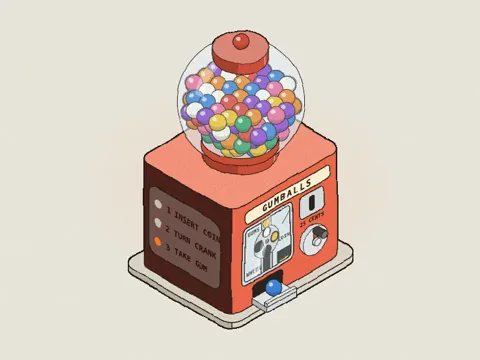
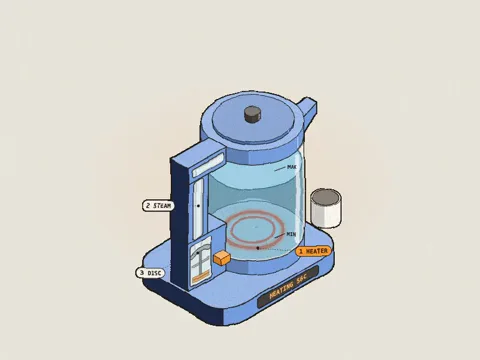
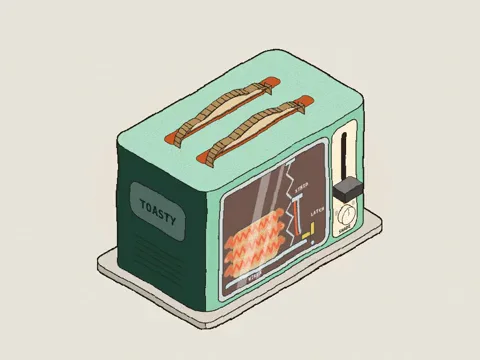
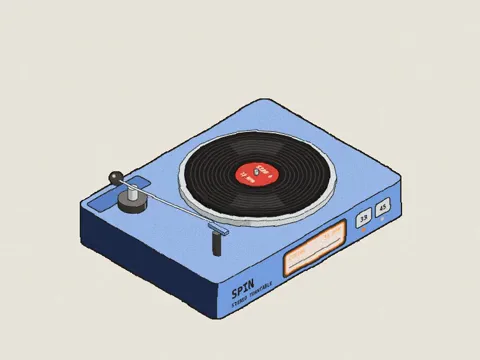
Starter prompt
After installing the skill, paste this into Cursor, Claude Code, or Codex.
Use the colorfigures skill to draw a washing machine I can turn around. The door opens, the drum spins, and See-through shows the labelled parts inside.SKILL.md
---
name: colorfigures
description: Build colourful, hand-inked, interactive isometric figures of everyday objects and machines (washing machine, vending machine, toaster, kettle, lamp, claw machine, coffee set, arcade cabinet…) as one self-contained HTML page — real 3D bodies shaded in flat light/mid/dark bands, a heavy ink silhouette with finer inner lines, a flat blue cast shadow, warm paper and body-colour swatches. The viewer drags to turn the object all the way round, flips on See-through to watch the real mechanism work inside with labelled parts, and zooms in; it works on a phone too. Every figure does something: buttons press, doors open, items drop, parts move. Use this whenever someone wants a colourful / illustrated / hand-drawn / sketchy isometric object, a "Colorfigures" figure, a "how does X work" or "what's inside X" figure, a cutaway or see-through of a machine, or a playable or clickable object illustration — even if they don't name the skill. For dark glowing line-art use iso-glow instead.
---

# Colorfigures

Hand-inked, flat-coloured isometric objects you can turn round, see inside and play with. Each figure is one HTML
page: a small engine (`assets/core.js`) plus your figure script, which models the object in 3D and draws it with the
engine's shapes. The engine owns the camera (drag to turn, a Turntable and Front view button, arrow keys), the
shading (three flat tones by the way a face meets the light, which turns with the viewer), the ink and the cast
shadow. `scripts/build.py` makes the finished page: it inlines the engine and adds zoom, notices, the See-through /
Labels switches and the phone layout.

A figure has three looks, all from the same model:
1. **The object**, closed, as you would see it in a shop: correct from every side, back and underside included.
2. **See-through**: the case fades to a ghost and the real working parts show inside it, moving with the buttons.
3. **Labels**: short name tags on the parts, lit in the accent colour while that part is working.

## Workflow

1. **Set up:** copy `assets/core.js` next to your figure (the page loads it with `<script src="core.js">` while you work).
2. **Read the references** before writing. They are complete demo figures:
   - `assets/examples/toaster.html`: the smallest. A rounded case, a lever, bread that toasts and pops, and a
     see-through with heating cards, carriage, spring, latch and bimetal strip.
   - `assets/examples/lamp.html`: a scene on a desk board with a jointed arm, a light pool and parts sorted per angle.
   - `assets/examples/claw.html`: a big machine with glass, a game played on a keypad, stats, and a dense
     see-through (gantry, motors, harness, coin path).
   Read `core.js` too: its helpers are short and commented, and the `mountFigure({...})` options are listed above it.
3. **Research the real object** (below, *Truth first*) and write the notes and the parts list at the top of your
   figure script before any geometry.
4. **Write `figure.html`** (name it after the object): a doctype/head shell, `<script src="core.js"></script>`, then one
   inline `<script>` that defines the geometry and calls `mountFigure({...})`, then `xrMount(() => ui, () => '')`.
5. **Look at it from every side** with headless Chrome (*Verify*), fix, repeat (at most 3 rounds).
6. **Build one file:** `python3 "<skill folder>/scripts/build.py" figure.html OUT.html`. Hand over OUT.html and say
   what the buttons do (the page shows no instructions).

## Truth first (how the real thing is built)

The figure is only as good as its model of the real object. Before drawing:
- **Write how it really works** as a short list of steps, and where every material is after each one (coin in the
  slot → coin chute → acceptor → cash box; water in the tank → pump → boiler → group → cup). Each button is one real
  step and things only move along their real path.
- **Write the parts list in the code** (a comment block, grouped: case, structure, mechanism, power, controls). For
  the see-through aim for 30–60 real parts: motors, gears, shafts, springs, boards, sensors, wiring, tubes, brackets.
  Look up proportions you are unsure of (a home espresso tank is 1.5–2.5 L: nearly full height, half the width).
- **Every part is held by another**: name what it is fixed to. Nothing floats. Cables and tubes run from a real port
  to a real port along walls and floor, never across open space.
- **Every driving part touches what it drives** (shaft to gear, gear rim to gear rim, pipe end to port): work the
  contact points out with numbers.
- **Lay out moving paths with numbers**: a capsule's fall, a coin's drop or a tube must clear every gear and shaft.
  Things moving into a container go up and over the rim, then down inside.
- **Scale things people use against people**: a push button at hand height (~1.1 m), facing where people stand.
- For buildings, research the building type first (for heritage types, the planning authority's own guide).

## Coordinates and camera
- `x` = depth (the front face is at `x = W`), `y` = width (+y goes viewer-left at the default view), `z` = up.
  Ground at `z = 0`. Scale ≈ 1 unit per cm (washer 62 × 65 × 88); small objects (a kettle) can be modelled bigger
  (60–100 units) so detail reads. Framing and line weight adapt automatically.
- The engine turns the camera; your scene is redrawn for the current view. `YAW`, `PITCH` (degrees) and `CAM_V` (unit
  vector toward the viewer) are readable. `?yaw=200&pitch=40` sets the view; `?free=1` lifts the turning limit.
- A figure turns ±60° around its front until you have checked it from every side; then add `turn:'full'` to its
  `mountFigure({...})` call and it turns all the way round. Ship with `turn:'full'` unless something can't be fixed.
- `size` = the object's true bounding box (handles, trays, a lifted part at its highest). `center:[x, y]` if the
  object isn't centred in it.

## Drawing correctly from every angle (there is no depth buffer)

The most repeated bugs, in order. Check every one before handing over.
1. **Never write a fixed back-to-front order.** "A then B" is only true for one view. Every separate part goes
   through `byDepth([{ at:[x,y,z], box:[[x0,y0,z0],[x1,y1,z1]], svg }])`, and **every part gets a `box`**: two boxes
   separated along an axis sort by which side the viewer is on; a centre point alone gets long or wrapping parts
   wrong (a pole beside keys, a spout past a cup, a door beside its shelves). A function that draws several things
   one after another is a fixed order too: return items and sort them.
2. **Faces: draw a face, and everything on it, only when it faces the viewer**: `vis(n)` / `facing(n)`. Buttons,
   displays, decals, windows, knobs, and their labels included. Something mounted on a face is drawn in front of the
   body while that face is toward you and *before* the body when it turns away, so the body hides it.
3. **Parts with no single correct order** (a fan head, a jug with a handle): test which side faces the viewer and
   write both orders: facing → far end first; facing away → the exact reverse.
4. **Things that wrap other things are split**: far half, contents, near half (`openShell(A, B, colour, contents)`
   for cups, cones, bins, drums). Never hard-code the visible half of a ring: `nearHalf()` / `farHalf()`.
5. **Split tall parts by height** (a pole, a stand, a spine): one section per thing beside it, each only as thick
   as the part, or sorting loops appear. When many long parts overlap, sort only the pairs that overlap on screen.
6. **Every solid has its far end and every face**: caps on whichever end faces the viewer, doors and flaps with both
   faces and both edges, wheels and plates with thickness and a rim (nothing real is a flat disc), open tubes with a
   rim and a dark bore.
7. **Concave parts are built from convex pieces** (`extrude`/`loft` handle convex profiles only), each with its own
   ink; no ink on the joins.
8. **Real objects have backs**: service panels, cords, coils, vents, a chassis under a truck. Parts seen only from
   behind still have real proportions. A part drawn only when "its" side faces you vanishes from other sides; wheels,
   mirrors and shelves always exist, sorted.
9. **Contents in an opening are real 3D objects behind the glass**, clipped to the opening (`clipTo`), and centred
   in it as seen straight on. Check numerically: list every opening and every item in one, compare centres and edges.
10. **Text sits on a face**: `tx`/`txY`/`txM` hide it when the face turns away; draw it after its face.
11. **After resizing or moving a part, re-check the order of everything it now overlaps.**
12. Flat things on the floor may go first, but after the cast shadows (opaque shadow fills paint over what's under them).

## Look
- Body: one palette `m = {l, m, d}` (light / mid / dark), shaded with `tone(normal, m)`. Small props and interiors use
  `toneI`. Other materials: `METAL`, `CLEAR`, `CERAMIC`, `DARK`, or `matOf('#hex')`.
- **Rounded bodies** (most machines): an `rrUV(...)` profile swept along an axis with `extrude(profile, x0, x1, m)`,
  which draws the banded rounded sides; draw the cap that faces the viewer and the silhouette ink yourself.
  Round things: `cyl` (upright), `cylX`, `rod(a, b, r, m)` (between any two points; a second radius makes a cone),
  `loft` between rings (`on(PZ(z), ellUV(...))`) for cones, cups, bottles, domes.
- **Ink:** silhouette `hullInk(points, ~2.8)` after the body; panel outlines ~2.2; openings 1.6–1.8; details
  0.8–1.4. Always draw through `pd()` on 3D points; `pd(pts, false)` for an open line.
- **Stand it on a board** if it sits on a table or desk: `board(...)` drawn first, a little bigger than the
  footprint, included in `size`. Floor-standing machines stand on the paper.
- **Cast shadow:** `castShadow(points, z0, clip)`, short and connected to the object (on a board, clip to
  `boardTop(...)`). Tall things on a thin support cast base, support and high part so the shadows touch.
  See-through parts (a cage, a glass dome) cast a lighter shadow: `<g opacity=".45">`. One shadow per object.
- Accent colours sparingly: status lights (`#43c25c` / `#e2483d`), screens (`#1d2a26` with `#8af0ae` text), glass
  (`#cfe9f0` at low opacity + 1–2 white streaks at ~.38 opacity). Only ink strokes are dark.
- **Neat over busy, slender like the real thing**: repeated hairlines 8–18, thin parts thin, attached parts touch
  their body at both ends, every detail big enough to read at normal size. Fill empty space with things from the
  scene's story (props on a board), sorted and shadowed like the rest.
- Plain letters and digits only in text: emoji and symbols render as blobs.

## See-through and labels

Give every machine or appliance with a working inside a see-through (a cup or a chair has none). The switches start
off, so the closed object is what people see first.
- Wire it like `toaster.html`: in `scene`, `const k = ease(st.xr || 0)`; while `k > 0`, draw
  `xrGhost(body, '', k, outline, x0, x1, m)` (far walls faint, the case as a ghost) and then the working parts at
  opacity `k` **over** the ghost. Bodies that aren't one box: `xrGhostRings` (between two rings) or `xrUnder`.
  After `mountFigure`, call `xrMount(() => ui, () => '')` (it adds the switches; captions are not shown).
- **Inside parts and every label draw above the ghosted shell**, never inside it, or they fade with the case.
  Whatever covers the mechanism fades too: glass, doors, awnings, globes, collars; handles and knobs on them are
  redrawn on top.
- **Cutaways belong only to see-through.** The normal view is the real closed object.
- Anything the case used to hide partly is drawn whole in see-through (bread down in the slots, a drink falling all
  the way to the bin), and motions that relied on a clip need real limits.
- A flat picture of a mechanism on a plate is not a see-through: build it in 3D. Long parts through a ring are drawn
  in pieces either side of it. Bearing plates are brackets, not slabs. Wires are short pieces so they sort with solids.
- **Labels**: `xrCallouts([{ at:[x,y,z], text:'BIMETAL STRIP', on }], bounds)` gives pills in two columns either side
  of the object, sorted so leaders never cross; draw them last, only when `k > .6`. Outside see-through, label
  surface parts with `tag([x,y,z], dx, dy, 'TEXT', on)`. Short names in capitals; `on` while that part works. Labels
  only name parts that are drawn. Anchor each label on its part and move it with the part.
- On a phone the engine draws each label as a numbered badge and the page lists the names under the figure, so keep
  to these two functions (or emit `data-n`/`data-t` on `.tag` and honour `LBL_U` if you write your own).

## Interaction (the fun part)
- **Follow the real process** (*Truth first*). 2–5 meaningful actions with real outcomes. **`buttons` are the
  interface**, in the order a person would use them (`{label, onClick(st, ui)}`, or `{label, choices: st => [...]}`
  for a picker, with `current: true` / `disabled: true, why: '…'`). Parts wrapped in `act('name', svg)` respond on
  *press* through `acts`; never add `click` listeners to drawn parts (the scene is redrawn every frame).
- **Every supply comes from something in the scene** (water from a jug, coins from a slot).
- Out-of-order presses do something sensible: run the missing step, or `ui.flash('Insert a coin first')`, a notice
  shown on the figure. `stats: st => [{label, value}]` (top right) for a measured quantity: credit, litres, score.
- Animations: `ui.animate(dt => { ...; return stillRunning; })`, eased, mostly under ~2 s, safe if another button is
  pressed meanwhile (one state object).
- **Games** (a claw machine, an arcade): `mountKeypad({...})` adds an inked pad (arrows + a round action button)
  that sends the same keys as the keyboard; set `window.GAME_KEYS = true` so the arrows play instead of turning the
  camera, and let space always trigger the action. On a phone it becomes one slim row under the figure.
- `params(st, q)`: read URL params for every interesting state (`?open=1&mode=spin`) so a screenshot can show it.
- No hint line, no captions, no explanation text on the page: words live on buttons and labels only.

## Reserved names
`core.js` owns these global names: **never declare them in a figure** (a clash blanks the page; short names like `S`,
`C`, `L`, `SH`, `f` are the usual trap). Prefix your own (`toastS`, `armL`, `tWire`).
`PALS METAL CLEAR CERAMIC DARK INK SHADOW C S OX OY VIEW RC RCZ VIEW_NAMES TURNS YAW0 PITCH0 YAW PITCH CAM_R CAM_U CAM_V
CAM_D CAM_B0 CAM_LIM camBasis setCam camDot camTo rotV yawTurn rotXY P0 P Dv depthOf boxMid sepOrder byDepth nearHalf
farHalf openShell f pd sp arcUV rrUV rectUV ellUV PX PY PZ on sub dot cross norm avg vis facing SHADOW_K AZ_MIN AZ_MAX
SHADOW_LEN L SH setLight LIN SOFT step3 tone toneI mix matOf ease ink fill face shape line loft hull hullInk box extrude
cyl cylX rod txM tx txY castShadow BOARD WOOD boardTop board act tag clipTo INK_REF_VB INK_K inkScale CORE_CSS
filterFor bakeNoise mountFigure xrCallouts xrGhost xrGhostRings xrUnder xrWrap xrMount mountKeypad`.

## Verify (the owner turns it round and zooms in, so you do first)
Render with headless Chrome over `file://` (Linux: `google-chrome` / `chromium`), each run with its own
`--user-data-dir`, one after another:
```bash
G="/Applications/Google Chrome.app/Contents/MacOS/Google Chrome"
for v in "yaw=45" "yaw=110" "yaw=170" "yaw=230" "yaw=300" "yaw=20&pitch=62" "yaw=200&pitch=70"; do
  "$G" --headless=new --hide-scrollbars --user-data-dir="$(mktemp -d)" --force-device-scale-factor=2 \
    --window-size=900,800 --virtual-time-budget=3000 --screenshot="shot-${v//[&=]/_}.png" "file://$PWD/OUT.html?free=1&$v"
done
```
1. **Every angle above**, closed and with `&xr=1&labels=1`. Look at 2–3× crops of each part, not just the whole
   image: nothing painted over a nearer part, no missing face, no floating part, no mirrored text, no part visible
   through a solid wall, the back makes sense.
2. **One `?press=` run of the main sequence** (`figure.html?press=Coin@300,Left@1500,Drop@2500`; `Label>Choice`
   picks from a picker), shot at two or three budgets, at the default view and from behind, in see-through too.
   Add one out-of-order press to see it answers sensibly.
3. **A 4× close-up of the mechanism in see-through**: every part held, every drive touching, wires port to port.
4. **A phone shot** (`--window-size=390,844`) with `&xr=1&labels=1`: badges and the label list read, nothing cut off.
5. **Errors:** run the press URL once with `--dump-dom` and check `<html data-errors="…">`; grep for `NaN`.
Fix what you find; when every angle passes, add `turn:'full'`. The figure's state is `window.__st`.

## When to use something else
- Dark, glowing line art → **iso-glow**.
Related skills
- Visual DesignCanvas DesignCreate beautiful visual art, posters, and static designs using design philosophy. Generates museum-quality work with a two-step process: philosophy creation, then visual expression.
 Anthropic45.5k
 - Visual DesignTheme Factory10 pre-set professional themes with colors and fonts for slides, docs, reports, and landing pages. Apply consistent styling or generate custom themes on-the-fly.Anthropic45.5k